



How Nihil Young Turns Sample Selection Into The Fastest Part Of The Writing Process
Nihil Young breaks down how Loopcloud helps him choose samples faster, organize 15 years of sounds, and keep ideas moving across a packed release schedule. The interview covers Auto-Key, smart tagging, DAW-synced previewing, built-in FX, and the 8-track loop editor.
Nihil Young is coming out swinging in 2026 with a release schedule that shows the true scale of his intensive creative output.
His full-length album is set for release on Zerothree in August, with “A Feeling” and “Just Be” already out and “You and I” arriving later this month on May 29. The project brings together the melodic, progressive, house, techno, and cinematic ideas that have shaped his catalog across labels such as Toolroom, Purified, Odd One Out, Enhanced, Armada, Zerothree, and Magnetic Magazine Recordings. Recent activity around “Animals,” his Dirty Doering collaboration “NXTBND,” his Magnetic single “Automatic,” and his upcoming Birgit Berlin date with Darin Epsilon also place this album cycle in the middle of a busy run across original music, remixes, and club appearances.
That pace requires a sample-hunting workflow that must keep up with him.
Throughout our conversation with him, Nihil Young explains how Loopcloud helps him move from search to arrangement with less friction, starting with Auto-Key, DAW-synced BPM previewing, and the ability to audition ideas in context before committing to them. For any producer working across melodic house, progressive, techno, and indie dance, that level of organization changes the entire role of a sample library. Instead of digging through folders, Nihil can filter by key, tempo, duration, instrument, genre, and custom tags, then test loops together inside the 8-track loop editor before pulling anything into the DAW, which even Nihil Young admits is a complete game changer with how fast he can get the job done in the studio and get tracks ready to release and play out live.

The most useful part of the conversation is how in-depth Young gets. Nihil Young talks about syncing 15 years of his own samples into Loopcloud, using smart tagging to rediscover older material, saving searches for faster recall, and processing sounds inside the browser with EQ, compression, delay, reverb, filters, GrainStretch, and modulation. It is a clear and obvious breakdown of how one of the most prolific producers in melodic techno manages a large archive while staying focused on writing.
For Loopcloud users, the conversation illustrates how sample selection, organization, previewing, and early processing can become part of the creative process before a sound reaches the session.
When you open Loopcloud at the start of a writing day, what are you usually looking for first, and how does the browser help you get there faster?
I usually start by setting the key of my project in Loopcloud.
Thanks to the Auto-Key function, once I set the desired key, all the previews of my samples and loops are automatically transposed to match it in real time. The BPM syncs automatically with my DAW, so everything is perfectly in time without any manual adjustment.
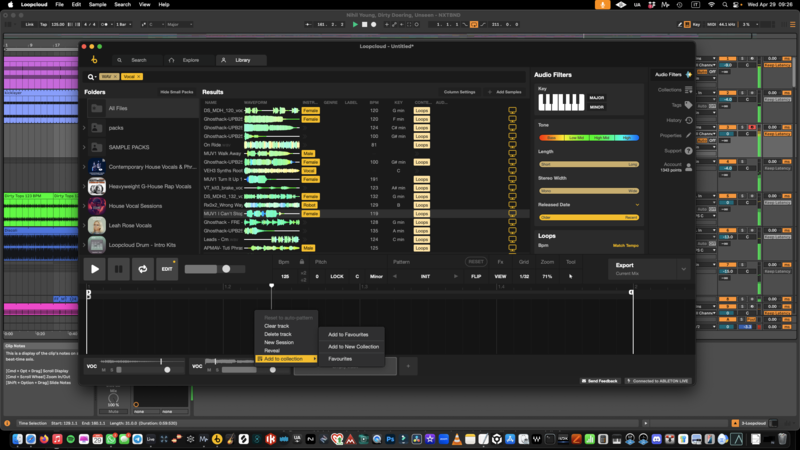
What’s even better is that I can immediately throw multiple samples into the 8-track loop editor, from my own library or from the Loopcloud store, and build a quick mini-arrangement right inside the browser. This lets me test how different sounds work together in context before deciding to spend any credits. Once I’m happy with the selection and arrangement, I can save the entire Loopcloud session and recall it later. I can also add that session folder directly into the browser for quick access. It gets me from zero to creative flow in under a minute.
What I love most is how it removes the friction. I can audition dozens of ideas quickly without leaving the browser, which keeps the creative momentum going instead of killing it with technical headaches.
You are clearly a big fan of the browser side of Loopcloud. What does it do better than digging through folders manually on a hard drive?
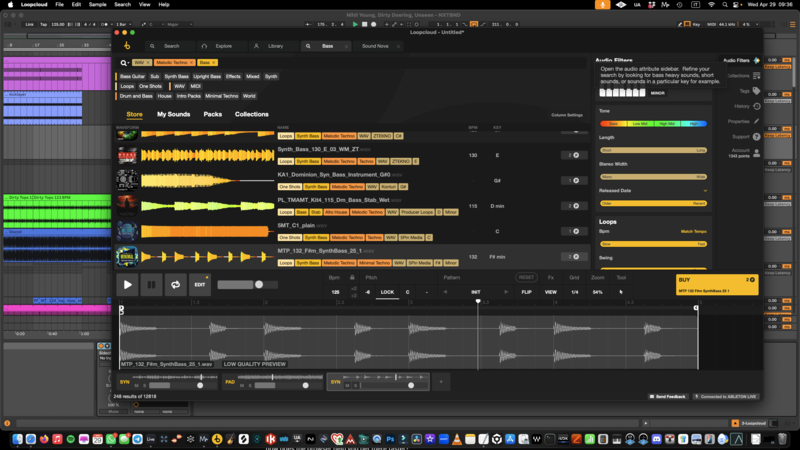
It’s not even close. Manual folder digging is slow, chaotic, and demotivating. Loopcloud lets me filter by duration, key, BPM, genre, instrument, and especially its powerful tagging system. The Auto-Key feature is pure gold. I set the key once and every preview is automatically transposed to match, while BPM stays perfectly synced.
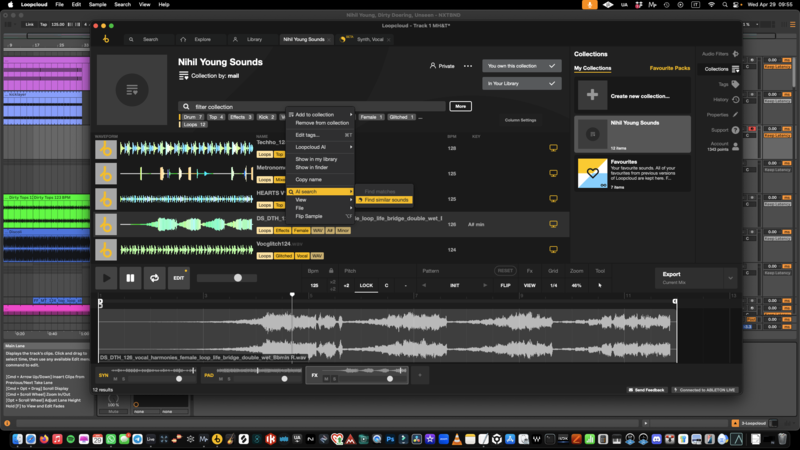
While searching by tags, I can right-click on any tag and choose “Exclude” to instantly remove unwanted sounds. There’s also the AI Similarity Search, currently in beta, which is incredibly useful: I can select one of my own sounds and instantly find similar ones on the store. Plus, the real-time preview with DAW sync and built-in editing tools makes the whole process feel like playing rather than searching.
The built-in FX are a game-changer too.
I can quickly add delay, reverb, GrainStretch, compression, EQ, or filter directly in the browser before dragging anything into my DAW. It turns sample hunting into something genuinely fun and intuitive. The difference is night and day. Instead of getting lost in nested folders, I stay focused on the music.
A lot of producers build up massive sample libraries over the years and then stop using half of them because finding anything becomes a headache. How has Loopcloud helped you actually use the sounds you already own?
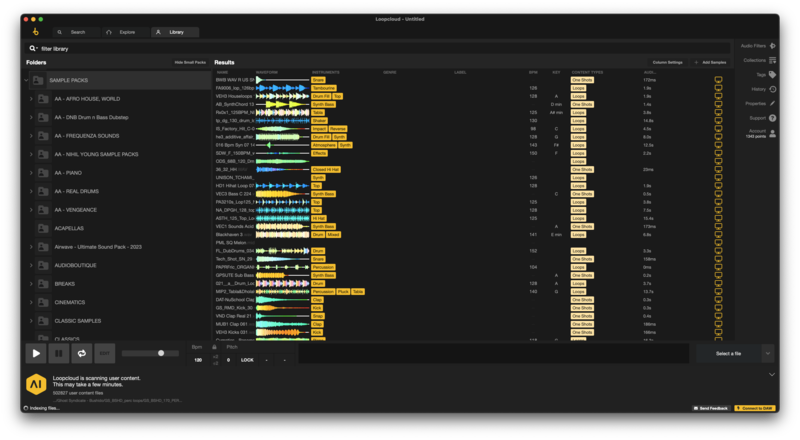
After 15-plus years of collecting, I had thousands of stems and samples scattered everywhere. I synced my entire collection into Loopcloud, and it automatically analyzed and tagged everything. Now I actually use sounds from 2012 that I had completely forgotten about. It turned my old library from a graveyard into a living, searchable resource.
I’m constantly rediscovering hidden gems that I recorded years ago. Loopcloud has literally doubled the usable size of my sample library without me buying a single new pack.
How do you organize your samples in Loopcloud so they are easy to find later when you are moving quickly in a session?
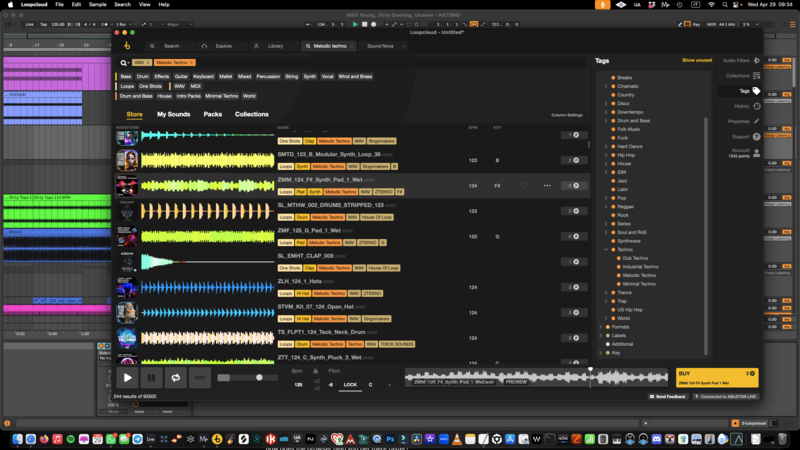
I rely heavily on the smart auto-tagging for BPM, key, and instrument, then I add my own custom tags like project name, mood, vocal chop, or atmospheric pad. I also use the smart search and favorites a lot. Once everything is tagged properly, I barely touch folders anymore. I search or browse by multiple filters, and it’s lightning fast even in the middle of a session.
A useful tip: I save my frequent searches so I can recall them instantly later. This system has become second nature. Even when I’m deep in a session and moving fast, I can pull up exactly the right sound in seconds without breaking my creative stride.
Are there parts of the browser that you think users overlook at first, but that become essential once you spend real time with the platform?
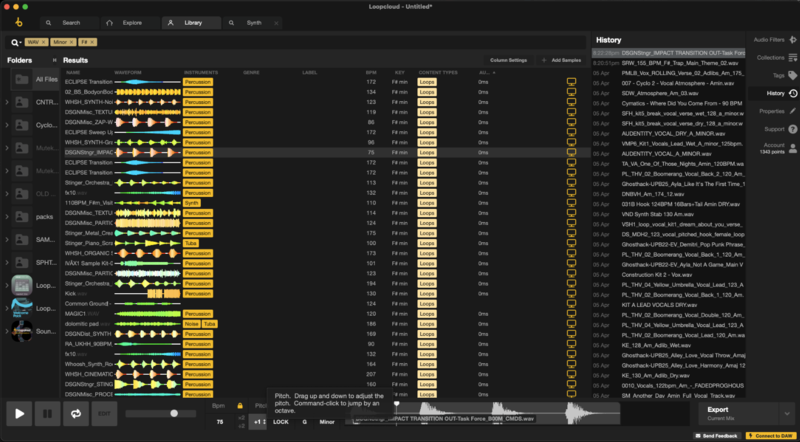
The real-time editing tools inside the browser, including chopping, pitching, effects, and the 8-track loop editor, are hugely underrated. Being able to tweak and audition a sound heavily before dragging it into the DAW saves so much time. Also, the advanced filtering by duration and the AI-powered search suggestions become addictive once you get used to them.
What really surprised me is how powerful the built-in FX section is. You can chain multiple effects like EQ, Compressor, Delay, Reverb, GrainStretch, and Filter, and even use the modulation capabilities to automate parameters or add movement to individual regions. The 8-track loop editor is the craziest part. You can actually build a full tune idea directly inside the browser with drums, bass, chords, and melodies, layering up to eight tracks, adding FX and modulation, before sending anything to the DAW. It’s insane how fast you can sketch out complete ideas.
Do you think Loopcloud changes the way producers relate to their own libraries, especially for people who have spent years collecting sounds without a clear system?
Absolutely. It completely changes the relationship with your archive. Instead of feeling guilty about unused samples, you start seeing your entire 15-year collection as a real instrument. For someone like me who produces a lot of tracks across many different projects, Loopcloud has become essential. It keeps me fast, creative, and stops me from wasting credits on new sounds when I already own something perfect.
It gives you back ownership and joy over your own archive. After years of chaotic collecting, it finally feels like I have a proper system that grows with me instead of burying me.
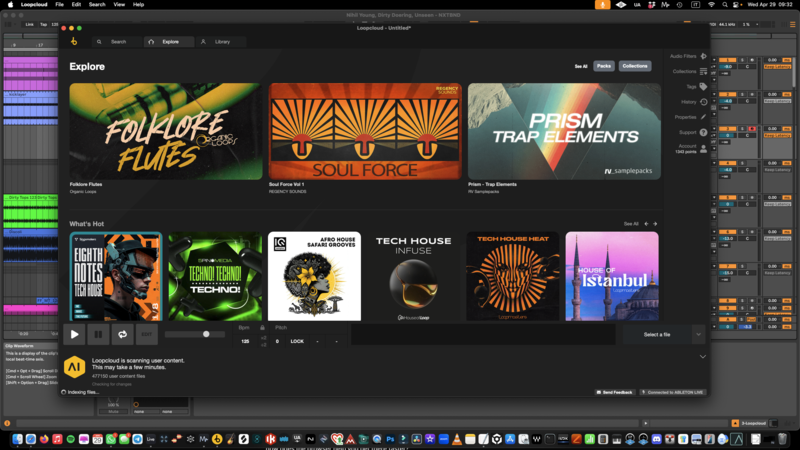
After trying many sample browsers and managers, Loopcloud’s browser plus VST is now my absolute favorite. The combination of smart tagging, powerful search, including AI Similarity Search, Auto-Key transposition, automatic BPM sync, real-time editing, built-in FX with modulation capabilities, and that 8-track loop editor makes it incredibly efficient. You can seriously audition store samples in a full arrangement, save the session, and recall it later, all before spending any credits. It helps me work faster, reuse way more of my own library, and stay inspired without breaking the creative flow. If you produce a high volume of music like I do, this tool is a total game-changer. Highly recommended.
Wrapping Up Our Chat With Nihil Young

Nihil Young’s workflow points to a practical reality for any producer managing a large sample library: speed comes from organization before the session gets crowded. By using Loopcloud to tag, filter, audition, process, and arrange ideas before committing them to the DAW, he keeps sample selection connected to the writing process rather than treating it as a separate task. That becomes especially useful when older recordings, forgotten stems, and new store sounds can all be searched from the same place and tested in key, in tempo, and in context.
For producers trying to finish music more quickly, his approach offers a subtle and obvious solution. Build a system that helps you find useful sounds quickly, save the searches you return to often, process ideas early enough to hear their potential, and keep your own archive active instead of letting it sit unused on a hard drive. Loopcloud gives Nihil Young a faster way to move from idea selection to arrangement, and in a release year as full as his, that kind of workflow has a direct impact on how much music can actually get finished.
Keep Ideas Moving
Try Loopcloud free for 14 days. Cancel anytime.

Import your existing sounds · Works with your existing DAW · Setup in under 2 minutes