
Blog
Boost Your Workflow with these 20 Production Productivity Tips
22 Apr '2026
Sidestep creative obstacles and start following through on your ideas with this guide to efficient music production

Cover Photo by William M. on Unsplash
Whether you’re a total novice trying to finish your first full track, or a seasoned music production veteran with a catalog of releases under your belt, chances are you’ve got a hard drive full of eight-bar loops that you just can’t seem to develop into something more substantial. While it can be frustrating, this is a pretty occurrence when making electronic music, as by its very nature it’s built on a lot of repetition and looping.
Getting a bird’s eye view of what the track needs and then expanding beyond your initial idea can be tough. In this article, we’ll explore some techniques you can employ to take what you have and bring it to its natural conclusion.
Introduce variation
While it might not seem like the most exciting option, duplicating your existing eight-bar loop and adding some variation to the duplicated section can be a good starting point. It not only doubles the length of your existing composition, but will help to keep your arrangement more interesting and varied as the track progresses.
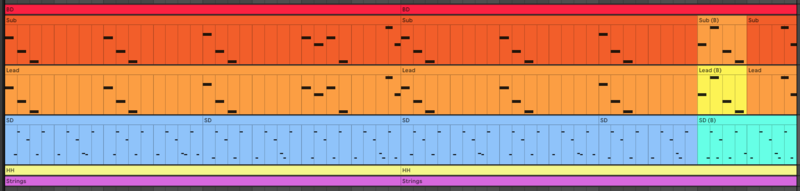
Experiment with reversing parts, adding pauses, automating effects or writing melody variations to create a unique part B to your original loop. Remember, the intention is to keep the audience interested and excited, something that can be achieved even with subtle changes to a simple arrangement.
Use a reference track
When you’ve only got a vague idea about the basic premise of your song, it can be hard to see how it’s going to progress. Using reference tracks can be a helpful way around this issue. Try dragging a track of a similar style into your DAW, syncing it to your project’s BPM and adding track markers to label the sections of the reference track. By adding in track markers for the intro, break/build, drops/choruses and so on, you can develop a rough structure of your own that your track could follow.
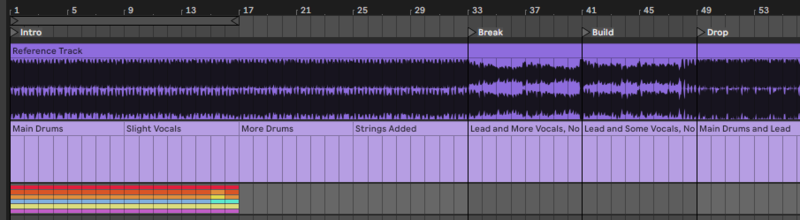
You could even start to pay attention to which elements are present in each section, for example, the introduction may contain some light percussion and a pad or texture. Try creating a MIDI track with empty MIDI clips below the reference track, and renaming the clips with comments on the corresponding section.
While this might give you a rough indication of how you could arrange your song, there is no set way to structure it and you should try to base your final composition on its own individual flow and feel.
Define your sections
Once you have sketched out the structure of your track using a technique like the one mentioned above, you can go a step further and decide what kind of energy or emotion you’re trying to convey during each of the sections. Create another MIDI track with empty MIDI clips and rename them according to what you want to accomplish at each section.
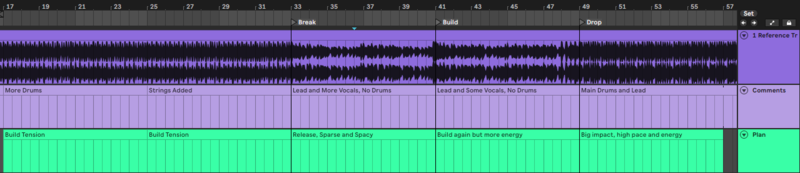
For example, at bar 32 you might want eight bars which generate tension followed by eight bars of release. Once you’ve decided on what you want your song to do and when, you can then decide on the elements that need to be present to achieve that.
If you’re not sure on how to achieve the desired energy or emotion, listen to some more reference tracks and make notes on how other artists invoke certain feelings in their compositions. They might give you some ideas on compositional strategies or processing techniques, and after doing this you should have a roadmap for how you want the energy and vibe to progress throughout your own song.
Mute tracks or clips
Now you have some signposts to direct the flow of your composition, it’s time to start arranging. A good way to start an arrangement is to mute all of your tracks or clips, and experiment with bringing elements in and out to see how they work together. Auditioning different configurations of tracks will give you some options for how you want to structure an intro, build, drop or other section.

Work in multiples of four-bar sections and slowly bring in more and more elements as you build up the energy of your track. Try dropping out certain sounds for a bar or two before the introduction of a new element, as this will keep the arrangement interesting and indicate to the listener that there is a change imminent, thus creating suspense. And of course if you think your arrangement is missing something to get from one point to another, you can always create transitions using effects or automation to get there.
Start from the middle
Common sense would suggest that starting your track from the beginning and working through it chronologically is the most logical way to approach an arrangement. Starting from the middle, however, may help you to get out of a rut if you’ve got most of the elements of your track ready to go, but are stuck in the confines of a loop.
Try placing all of the ingredients of the track at the start of the first chorus, as defined by the blueprint for the track that you sketched earlier. Your chorus is likely to be one of the sections of your track with the most energy, so you’ll probably want to leave all or most of your elements playing during this section.
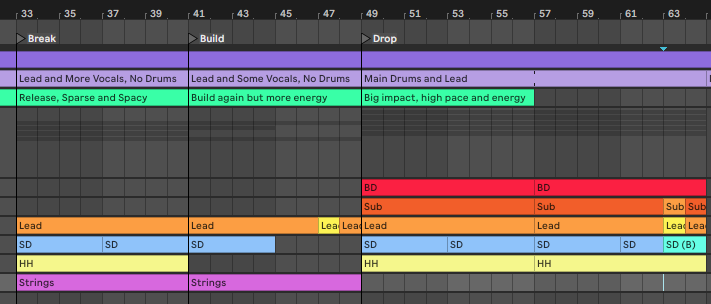
From here, you can work backwards to the other sections. Now that you know how the highest energy moment in the track is going to sound, you can reshuffle the arrangement to find a route to that point through a build up or intro. With a chorus now locked in, you know your track’s destination and can go back to working in chronological order if you prefer.
Automate your transitions
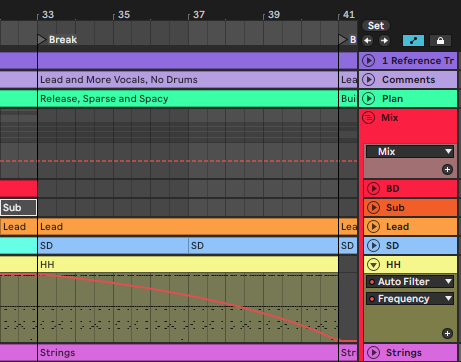
While suddenly dropping parts of your track in and out of the arrangement can be great for creating impact and urgency, a lot can be said for slowly teasing new elements into the mix to create anticipation. For this technique, automation is your friend.
Try automating a sound’s volume or filter cutoff to slowly introduce it to your listeners. Not only will this add tension to your track, but it will give a sense of gradual evolution that may not be achievable by simply muting and unmuting elements. For example, you could try automating the mix of a reverb so that a distant, washed out texture slowly gains clarity until it becomes completely dry and takes prominence in the mix.
Try some randomisation
Many DAWs and plugins have generative, random and probability features that enable you to humanize and vary elements of your productions, which helps to create organic sounding arrangements. For example, Ableton Live now allows you to adjust the probability of a note triggering, and set a velocity range within which the note will hit. This is designed to replicate how a musician would play a real instrument, as they may play at an inconsistent velocity or miss notes entirely.

Additionally, assigning un-synced or random LFOs to chosen parameters can make your track sound like it's constantly shifting and morphing, which prevents your composition from sounding too static. Try assigning an LFO to an effect send amount or delay feedback, then adding another LFO to the first LFO’s rate or depth for truly varied modulation that rarely repeats itself.
If in doubt, comp it out
Most modern DAWs offer some form of comping feature, allowing you to save multiple versions or takes of a particular element within one track, combining (or compositing) the best parts of each into one complete phrase. While its primary use is for recording and splicing together the strongest parts of performed recordings such as vocals or guitars, there are many alternative uses for comping.
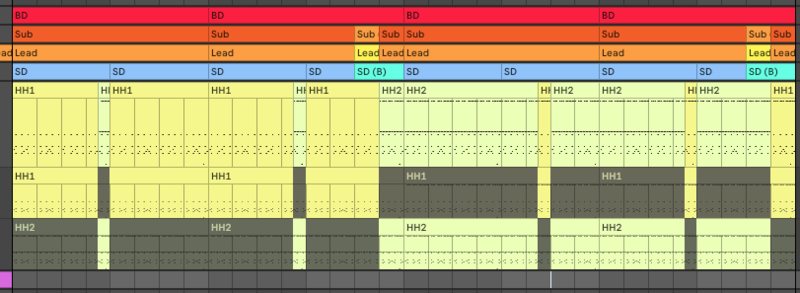
One such use is to store variations of a part in a neat and organized way, then call on them at different sections of the arrangement. For example, if you have a synth line with three separate melody variations, you can store two of them in take lanes so that they can be quickly and easily selected for playback during certain points of your production. This means you can get creative with the variation of your tracks in a non-destructive way, while keeping your project neat, tidy and clear of clutter.
Take a brain break
This is sound advice at many stages of the creative process, whether you’re having writer’s block during idea generation, structuring your next hit, or mixing your fully arranged track. Sometimes it’s hard to gain perspective on something you’ve listened to over and over again, and forcing progress can become destructive to your overall project. If the above pointers don’t help you to develop your loops in the direction you want, try taking some time away from the project or from the production altogether.
Similarly, you can try asking your friends or peers for input. Sometimes an untrained pair of eyes (or ears) can give you a useful insight into how your production sounds to a first time listener. Often, an outsider’s perspective is all you need to get you over that first hurdle.

Prep before production
An effective tactic for efficient music production and avoiding getting stuck in an eight-bar loop is reducing the things that can take you out of creative flow when you are in it. Removing obstacles and potential rabbit holes that slow you down, and make you forget where you were going in the first place.
Getting sidetracked by sound design in the middle of a session could do this; so could the cliche EQing your snare for 30 mins, making a drum loop from scratch, and many other things. You can get around this by having “pre-production” sessions before you sit down to make a track. You could use these sessions for sound designing lots of different sounds, creating full drum loops, organising samples, and more. This means that when you’re in the creative flow, you have a selection of your own loops to choose from that sound good already, you are familiar with, and you know you like, ready to go.
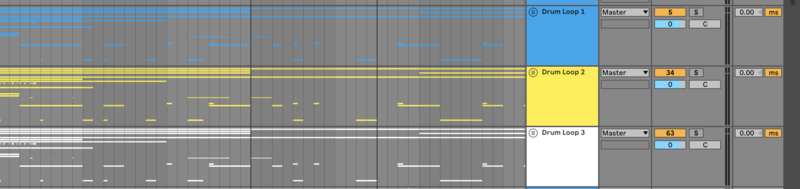
Top tip: With the Loopcloud App you can create loops with multiple samples playing simultaneously from our extensive library of sounds. And you can add them easily to your DAW as a single mixed-down file, or as separate audio files.
You could set an aim to make five drum loops, five arps, and five chord progressions in one session, label, and organise them. Or just focus on one element in each session. Either way it gives you more options when it comes to writing and finishing a track.
Separate writing and mixing sessions
You could also separate your production sessions further, splitting up writing a track, and mixing down. This can help you to sketch out an idea, and not get bogged down with details. Thinking about the bigger picture, before you finesse it later. It also gives your ears and brain a rest to get a fresh perspective on the track. And it can help to save time, as it can stop you spending ages mixing an idea that ultimately you don’t like that much anyway.

Credit: Joe007
Create a template
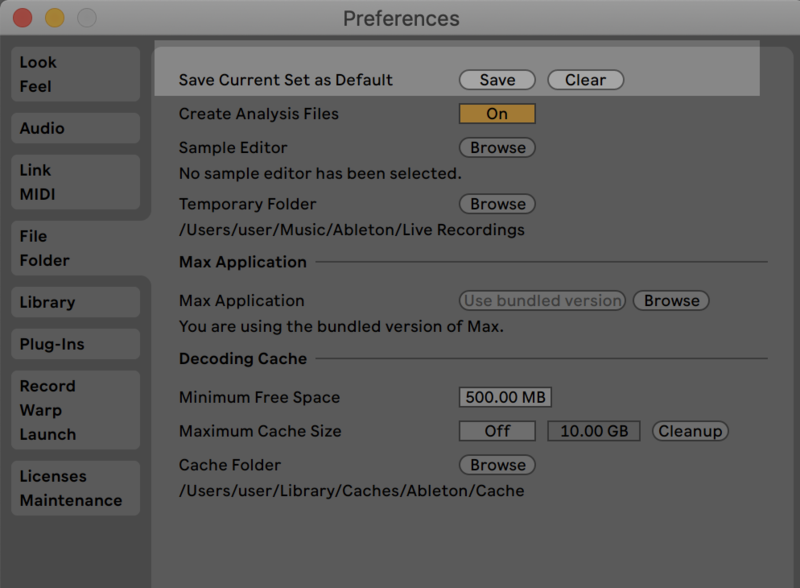
It’s likely that you will have a similar workflow every time you make a track. Favouring certain instruments and plugins, using the same buses, writing a chord progression on a piano etc. Creating a starting template that you can use each time you sit down to write a track can save you time, makes an empty screen seem less scary, and help to optimise your workflow. Adding audio and MIDI tracks to a project, dragging your synth of choice, then an eq, etc. does not take much time on its own, but it can add up when you do it 30 times, and it’s another thing that can get in the way of creative flow.
Set your usual buses up in a template, colour code, and label them. You could add your go-to synth to certain channels. Add some reverb to intro sections for instant atmosphere. You could include things FX like risers and downsweeps, anything that helps you to create a vibe quickly. You can always swap sounds out for different, and more fitting samples later.
Write the intro first
A contrasting technique to starting with the middle first. Writing the intro of a track first can sometimes help to remove the chance of you getting stuck in an 8 bar loop.
It can help to set a vibe first which can help ideas to flow, and can lead to a more cohesive song with an intro and chorus that are connected, and not disjointed. Working for a while on the intro can sometimes mean that you have an idea for the chorus by the time you get to it, without having to think too much about it. And before you know it, you have an intro, and the main section done, and the track just needs some more fleshing out.
Find what works for you, and each song that you write.

Use contrast
If you’re struggling to expand a loop into a whole idea, thinking about contrast could help. This applies to the bigger picture of the song and its individual elements.
If you are struggling to write a new section, you could identify the characteristics of a finished section, such as the chorus, and contrast these with the opposite in the new section. If one section is energetic, the other could be more subdued, for example.
You can apply this concept to individual elements in the song as well. If a synth sound is plucky in one section, you could make it into a pad in the next. You could change chord progressions into an arp. If a piano is staccato, make it legato. You get the idea.
Contrast can not only give you more ideas to help expand things, but it can make the vibe of each section stronger, more pronounced, and prominent. And add to the drama, and storytelling of your track.
Learn your tools
Unfortunately this tip isn’t shiny or exciting, but it can get results. Another way to maximise your creative flow when you are in it, and get tracks finished quicker is becoming a master of your DAW and plugins. Knowing what the tools you have are capable of, and not wasting brain power on working out how to do something, or remembering a shortcut, can all help to capitalise on creativity when it comes. This could help if you are a beginner, or advanced producer. You could find something that changes your workflow massively, or many small things that add up.
Top tip: Check out the shortcuts for the Loopcloud App here.
Organise for efficiency
Another not glamorous but it gets the job done tip. Scrolling through folder after folder of presets or samples is another way to stall creativity. You could separate presets out in Serum based on genre for example, the same with vocal samples, chord progressions by feelings that they evoke, etc. Organise with a system that you repeat, and/or schedule separate sessions to get on top of it.

Credit: Photography_by_Sebbi
Upskill
We don’t recommend buying course after course in the hope that you will increase your productivity. But sometimes you haven’t learnt all the skills and techniques you need to finish music often. Maybe there is a certain place you get stuck, or with certain styles you just run out of ideas. This could be a good chance to invest in a course, or get private tuition, and up your skills.

Image by Prodbydaan on Pixabay
Zoom out and think about the bigger picture
This one is a little conceptual but thinking about the theme or core idea of a song can help to spark new ideas and to make creative choices that lead to a finished track. What story do you want your track to tell? For example, if you have a vocal talking about reaching a goal, maybe the intro should be small, and low in energy, but the main chorus is inspiring, epic sounding, and full of energy, and you may want the end of the song to have a feeling of resolution. Once you know the vibe on a wider level, you can make instrument, and arrangement choices accordingly.

Credit: FredrikWandem
Finish more tracks
In order to finish more tracks, you need to make more tracks. This may seem obvious, but finishing tracks, even if you don’t think you will use or release them can help you to get out of the 8 bar loop trap. This is because each stage of song production requires different skills, and if you don’t try and finish any of your tracks, then you don’t practice the skills you need to finish, so when something epic does come along, you don’t know how to expand it, and you stay stuck.